


Tenpin Toolkit: Bowling Tools
4.9136.00 Reviews
App Specs
- Version
- 2.7.4
- Updated On
- License
- Free
- Downloads
- 50,000+
- Developer
- Tenpin Toolkit
- Categories
- Sports
- Platform
- Android
Screenshots
 Analysis by AppCompare
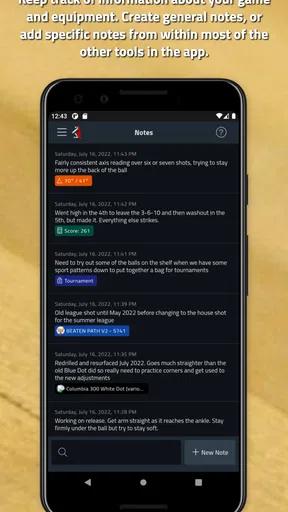
In my first week with Tenpin Toolkit: Bowling Tools, I’d treat it less like a magic coach and more like a notebook that can help make practice deliberate. The app is a sports tool from Tenpin Toolkit, and its appeal is clearest when I have a reason to record what happened on the lanes rather than simply open it out of curiosity. A quick note after a game can turn a vague feeling—“that session went badly”—into something I can compare with later practice.
What makes the first sessions useful
The strongest early habit is to choose one question before bowling. Am I leaving the same kind of spare, or does my shot change when the lane feels different? Score records and shot mapping are more useful when I’m looking for an answer to that question than when I try to log everything at once. I’d start with a small amount of information I can reliably enter, then add detail only if it helps me make a decision next time.
That approach also keeps the app from interrupting a social game. I can save the detailed review for after the session instead of checking a phone between every frame. For a league bowler, a coach, or someone who practices with a specific goal, that separation matters: bowl first, reflect afterward. If I only play occasionally and have no interest in reviewing results, the record-keeping may feel like extra work rather than a benefit.
Why the value can last beyond novelty
Tenpin Toolkit is free to download, has an Everyone age rating, and has a 4.9 average from 945 ratings, with 50K+ installs. Those figures suggest that it has found an audience among bowlers, but the lasting value for me comes from whether I return to the information. A score history is most useful when it helps me set a sensible practice goal, not when it becomes a pile of numbers I never look at again.
A practical month-to-month routine could be simple: review a few recent sessions, pick one recurring weakness, and use the next visit to work on it. If I’m practicing spare shooting, I can focus my attention there rather than treating every game as a general test of ability. Coaches can also use a consistent record to guide a conversation with a bowler, provided both people agree on what to track and the notes stay understandable.
Where it fits among bowling alternatives
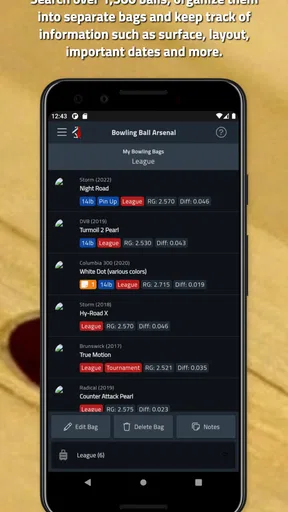
The app’s mix of scoring, shot visualization, advice, and customization gives it a broader role than a basic scorecard. A paper notebook can be faster for someone who wants to jot down a few observations without navigating an app. A bowling center’s scoring display is enough for people who only need the current game total. I’d choose Tenpin Toolkit when I want to connect results with practice decisions; I wouldn’t install it just to duplicate a score that is already visible on the lane screen.
Its value also depends on how comfortable I am turning observations into adjustments. Visualization can help me think through lane conditions, but it is not a guarantee that a particular line or ball choice will work. I’d use it to organize questions and compare my own sessions, then make changes cautiously. For a beginner, one clear observation—such as noticing a recurring spare problem—may be more actionable than trying to interpret several patterns at once.
Worth Reading Before You Choose

Switching to Android Auto Means Rethinking Your Driving Routine

Google Calendar Makes a Crowded Week Easier to Manage

Baby Panda World Brings Quick Play to Modern Phones, but Its Game Library Feels Busy

ESPN’s Live Game View Makes Following Close Games Easier

QuizzLand Review: A Good Fit for Short Trivia Breaks, Not Every Player

Basketball Stars: Multiplayer Is Fast, but Can It Recover When Matches Go Wrong?
A Comprehensive Toolkit for Bowlers
The first thing you notice about the Tenpin Toolkit is its wide range of features. It’s like having a coach in your pocket. From tracking your scores to analyzing your performance, this app covers all the bases. It’s designed to help you make informed decisions on the lanes, and boy, does it deliver.
Score Tracking Made Easy
Let’s talk about score tracking. This feature is a lifesaver for anyone wanting to keep a detailed record of their games. You can easily input your scores, and the app will do all the calculations for you. It’s not just about keeping track, though. The app analyzes your scores over time, giving you insights into your performance trends. It’s like having your personal statistician, always ready to give you the lowdown on your latest bowling sessions.
Visualize Your Shots
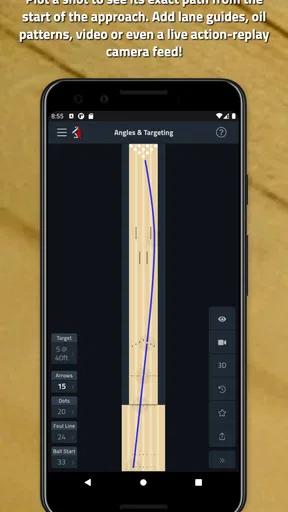
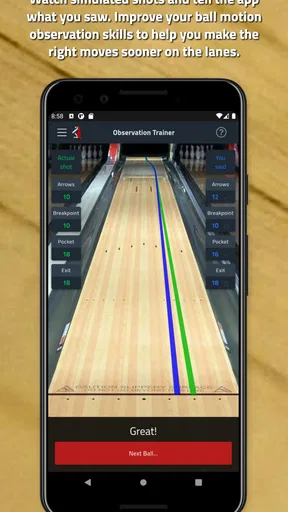
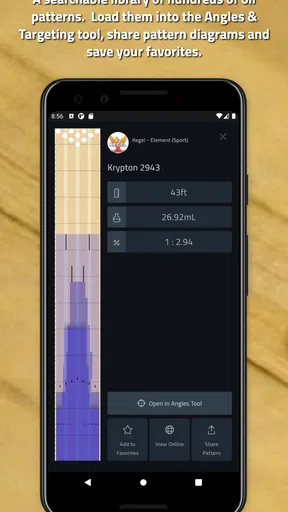
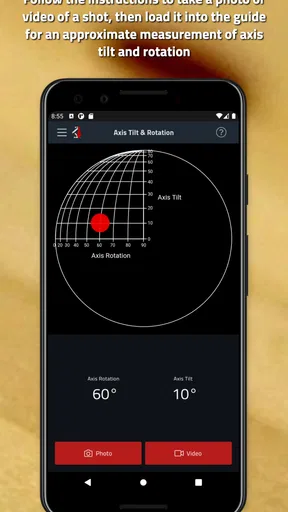
One of my favorite features is the shot visualization tool. It allows you to map out your shots and see exactly how you’re performing. You can visualize different oil patterns and see how they affect your bowling. This is a fantastic way to understand how different conditions impact your game and adjust your strategy accordingly. It’s almost like having a crystal ball that predicts how your ball will behave on the lane.
Tips and Tricks
Another gem within the app is its collection of tips and tricks. Whether you want to perfect your hook or master the art of spare conversions, there’s plenty of advice to help you sharpen your skills. And the best part? It’s all laid out in a straightforward manner. No jargon, just practical advice you can apply the next time you hit the lanes.
Customization Options
Customization is where this app truly shines. You can personalize your experience to suit your bowling style. Want to focus on your hook shots? Set up the app to prioritize those. Interested in spare shooting? Tailor the app to track and improve that aspect of your game. It’s all about making the app work for you, and I love that level of flexibility.
User-Friendly Interface
Now, let’s talk about the user interface. It’s intuitive and clean, which makes navigating through the app a breeze. Even if you’re not tech-savvy, you’ll find it easy to use. Everything is where you expect it to be, and the learning curve is practically nonexistent. It’s designed to get you up and running in no time, so you can focus on what really matters: improving your bowling game.
Community and Support
Being part of a community can be a game-changer, and this app has a great one. You can connect with other bowlers, share your achievements, and get tips from fellow enthusiasts. Plus, the support team behind the app is responsive and helpful. If you ever run into issues or have questions, you won’t be left in the dark.
Keeping it useful over time
Long-term usefulness depends on keeping the habit lightweight. I’d record only the details that help answer a real practice question, then review them at a regular point—perhaps after a session or before the next one. That reduces the chance of spending more time managing notes than bowling. It also makes a missed entry less disruptive: a useful record does not need to be perfect to reveal a recurring tendency.
There is a maintenance trade-off. The more carefully I track, the more meaningful comparisons can become, but the more effort each session requires. Someone who bowls in changing groups or casually drops into different centers may prefer brief notes over a detailed log. On the other hand, a coach working with the same bowler over repeated sessions may benefit from a consistent record, because it gives both people a concrete starting point for a discussion instead of relying only on memory.
Where friction can build
The main fatigue risk is turning every frame into a data task. If I pause too often to enter information, I lose focus and can make the outing feel like homework. I’d avoid trying to track scores, shot details, lane observations, and several goals all at once. Pick one purpose for a session, then decide afterward whether the extra detail was genuinely useful.
There is also a difference between seeing a pattern and knowing its cause. A score trend can show that results vary, but it cannot by itself explain whether the reason was technique, lane conditions, focus, or something else. Shot visualization is a way to organize thinking, not a substitute for coaching or careful observation. When a change does not help, I’d go back to a simpler baseline rather than piling on more adjustments.
Cost, compatibility, and who should choose it
The app is free, with in-app purchases listed from $9.99 to $28.99 per item. I’d begin with the free experience and decide whether I use its tools often enough to justify paying for anything extra; there’s little reason to spend before I know which parts fit my routine. Version 2.7.3 supports Android 5.1 and later, which makes it an option for many older Android devices as well as newer ones.
I’d recommend it most to bowlers who enjoy reviewing practice, people trying to build a repeatable spare routine, and coaches who want a practical aid for discussing progress. I’d skip it if I only want a quick game total, dislike entering information, or expect an app to diagnose technique without my own observation. It is better as a companion to deliberate practice than as a replacement for instruction, lane experience, or the scoring screen at the center.
Final Thoughts
In the end, the Tenpin Toolkit: Bowling Tools is a must-have for anyone serious about improving their bowling skills. It’s packed with features that cater to bowlers of all levels, and its user-friendly design ensures that you’ll spend more time bowling and less time fiddling with settings. So, whether you’re trying to break into the competitive scene or just want to impress your friends on a Friday night, this app has got your back. Give it a shot, and you might just find yourself rolling strikes like never before!
Pros
- Comprehensive bowling tools package.
- User-friendly interface for easy navigation.
- Accurate data analysis and tracking.
- Customizable settings for personal needs.
- Regular updates with new features.
Cons
- Limited free features; premium needed.
- No offline mode for data access.
- Occasional app crashes reported.
- High battery usage during long sessions.
- Requires initial setup for full benefits.
FAQs for Tenpin Toolkit: Bowling Tools
What is Tenpin Toolkit and how can it enhance my bowling experience?
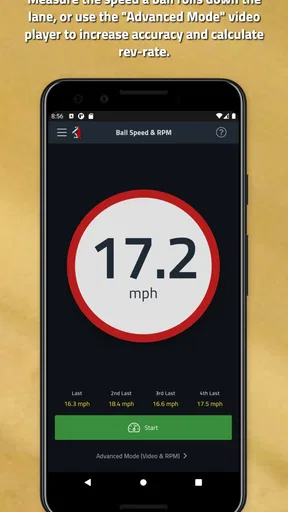
Tenpin Toolkit is a comprehensive app designed for both amateur and professional bowlers. It offers a variety of tools such as score tracking, ball speed calculator, and lane pattern analysis. By utilizing these features, bowlers can refine their techniques, track their progress, and gain insights into their performance, ultimately enhancing their overall bowling experience.
Is Tenpin Toolkit suitable for beginners, or is it more geared towards experienced bowlers?
Tenpin Toolkit is designed to cater to bowlers of all skill levels. Beginners can benefit from its easy-to-understand tutorials and tools that simplify complex aspects of bowling, while experienced bowlers can take advantage of advanced analytics and detailed performance tracking to fine-tune their skills and strategies.
Does Tenpin Toolkit require an internet connection to function?
Most features of Tenpin Toolkit can be used offline, allowing bowlers to access tools and record data without needing an internet connection. However, certain features, such as cloud backup and updates, might require connectivity to ensure data safety and app improvements.
How user-friendly is the interface of Tenpin Toolkit for new users?
Tenpin Toolkit is designed with a user-friendly interface that simplifies navigation through its various features. The app includes clear instructions and intuitive design, making it accessible even for those new to using digital tools for bowling. This ensures users can easily access and utilize all available resources.
What platforms is Tenpin Toolkit available on, and are there any device requirements?
Tenpin Toolkit is available on both Android and iOS platforms. It requires a device running Android 5.0 or higher or iOS 11.0 or later. The app is optimized for smartphones and tablets, providing a seamless experience across different devices, ensuring accessibility to all users.


